Drive Recorder - Dash Cam App
o16i AppsAuto & Vehicles
4.11.42K Reviews
- Version
- 2.1.5
- Installs
- 500.00K
- Age Rating
- Everyone
Screenshots
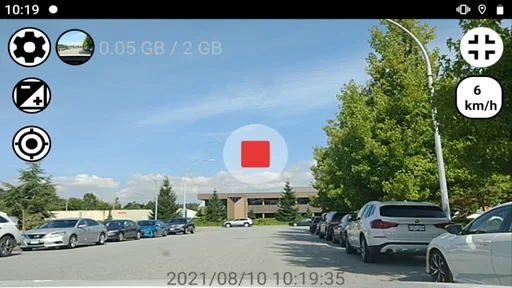
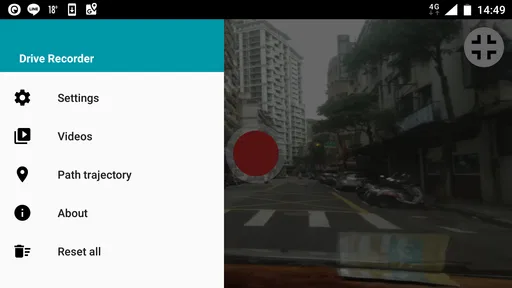
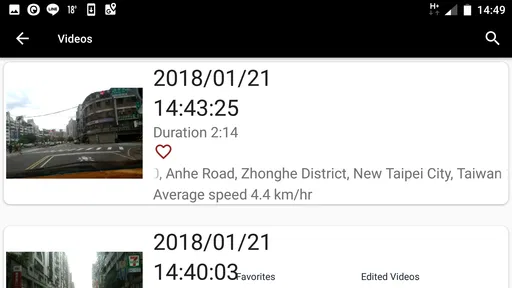
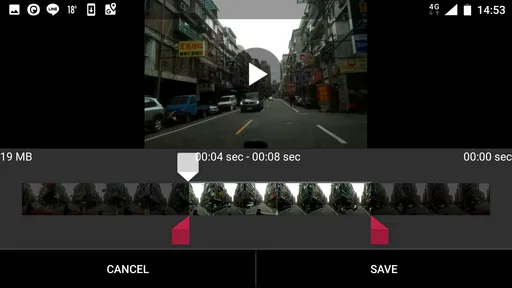
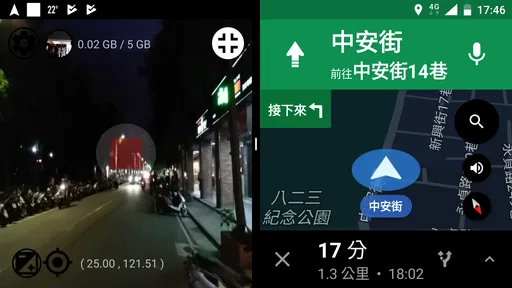
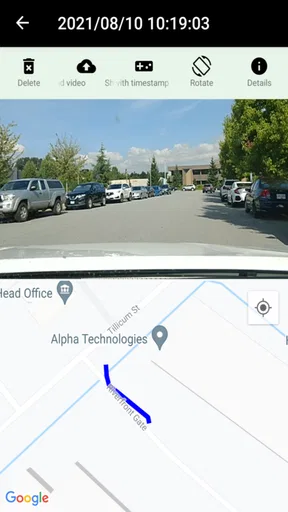
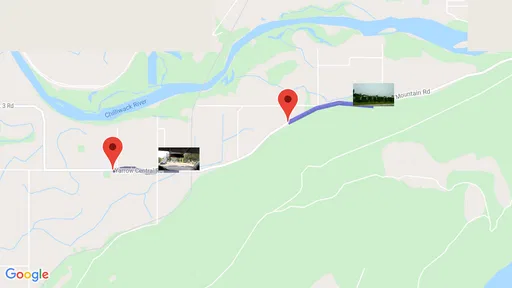
Our Review of Drive Recorder - Dash Cam App
 Analysis by Appyee
Ever found yourself wishing you had a reliable way to capture every moment on the road? Whether it's for safety, sharing a beautiful drive, or just keeping a record of your travels, a dash cam app can be a game-changer. That's where the Drive Recorder - Dash Cam App comes in. As someone who loves hitting the road, I decided to give it a spin and see what it brings to the table.
Where connectivity enters the picture
A phone-based recorder sits in a different place from a dedicated dash cam: it uses the device you already carry, so the practical question is not only whether it records, but how it fits into a connected phone routine. I’d treat Drive Recorder as the recording tool and keep navigation, calls, and any route planning in their usual apps. That division makes it easier to notice if the camera view or recording status needs attention, rather than assuming every phone task will work neatly alongside a long recording.
For a daily commute, the useful habit is to check the setup before pulling away, not while moving. Start the app while parked, confirm that recording has begun, and then leave the phone alone. A quick glance before departure is a better safeguard than trying to troubleshoot a recording or network issue at a junction. If you rely on live navigation, plan the route first and make sure the phone is positioned where the camera still has a clear view.
Choosing the right driving routine
This kind of app is most appealing to someone who wants occasional or regular trip footage without buying a separate camera right away. It can also suit a person who borrows a car, takes road trips in different vehicles, or wants a record of a particular journey. The trade-off is that a phone has several jobs competing for its battery, storage, screen space, and attention. A dedicated dash cam is usually the more sensible choice for drivers who need a permanent, always-ready setup or do not want to mount and prepare a phone for each trip.
Imagine leaving for work on a wet morning, with navigation running and a full commute ahead. I’d connect the phone to a charger before setting off, start the recording while parked, and check that the camera is not blocked by the mount or a reflection. Once underway, I would avoid handling the phone. After parking, I’d review only the portion I actually need rather than leaving long recordings to accumulate. That small routine makes a phone recorder more dependable and keeps the driving task where it belongs: on the road.
What to check before relying on footage
Video is useful only when the important details are visible. Before treating any phone dash cam as evidence, test the view in daylight and at night from the exact place where the phone will sit. A mount that works for navigation may aim too high, capture too much dashboard, or put glare across the windscreen. I’d also make a short test recording and play it back while parked; this catches framing or sound issues before a real incident makes the footage important.
Storage deserves a little planning too. Lowering resolution can help when space is tight, but that is a trade-off: a smaller file may be easier to keep, while fine details can matter when reviewing a road event. I’d choose a setting based on the phone’s available room and the kind of detail I need, then inspect a sample rather than guessing. Before a long trip, clearing space for new recordings is more useful than discovering a storage problem after the journey.
The GPS route and speed record can add context when looking back at a trip, but I would treat those details as supporting information rather than a substitute for clear video. If a route is being saved for personal reference, it may be helpful; if privacy matters, think carefully about who can access the device and its recordings. The same caution applies when sharing clips: check the whole video for identifiable people, homes, or location details before sending it on.
When another option makes more sense
Compared with a conventional dash cam, a phone app has the advantage of using hardware you already own and offering a quick way to capture a drive. The dedicated device alternative is generally better for a driver who wants a permanent installation, fewer setup steps, and a camera that does not compete with navigation for the phone. Compared with simply recording a clip on the phone’s standard camera, a dash cam app is shaped around repeated driving use, including background recording and trip-oriented information described here. Neither approach removes the need to mount the device safely and check the footage.
Connectivity can also affect what feels convenient. A phone may be online for maps or messaging, but that does not mean every recording task depends on a network or that footage is automatically backed up. I would not assume a recording has been saved elsewhere just because the phone has a signal. For an important journey, check the actual video on the device after parking and make a deliberate backup using a method you trust. If instant remote access to clips is central to your needs, a phone recorder without a cloud workflow may not be the right fit.
Setting Up and First Impressions
Getting started with the Drive Recorder is a breeze. After downloading it from the app store, the installation was quick and painless. Once it's up and running, the app greets you with a straightforward interface. No frills, just the essentials, which I appreciate. It’s like jumping into a car with a clean dashboard—everything you need is right there.
Drive Recorder is a free Android app from o16i Apps in the Auto & Vehicles category. It has a 4.1 average from around 27,000 ratings, and more than 500,000 installs, which suggests it has found a steady audience among drivers looking for a phone-based recorder. It is rated for Everyone, and version 2.1.5 requires Android 7.0 or later. Optional in-app purchases range from $0.99 to $99.99 per item, so I’d look at the purchase screen carefully before choosing anything beyond the free app.
One of the first things that struck me was the simplicity of its design. It doesn’t overwhelm you with too many options right off the bat. Instead, it focuses on its main function: recording your drive. That’s a breath of fresh air in a world where apps often try to do too much.
Features That Stand Out
The app's core function is to record video while you drive, but it goes beyond just that. The video quality is surprisingly good, capturing crisp images whether you're driving during the day or at night. You can adjust the resolution settings to save space, which is a nice touch for those with limited storage on their phones.
Another handy feature is the app’s ability to record in the background. This means you can use your phone for other tasks, like navigation, without interrupting the recording. Plus, it automatically starts recording as soon as you launch the app, so you don't have to worry about missing any action.
For those who like to keep track of their travels, the app includes GPS logging. It records your route and speed, which can be handy for reviewing your trip later on. This is especially useful if you’re dealing with disputes or just want to retrace your steps.
User Experience on the Road
Once you hit the road with the app, you’ll notice how unobtrusive it is. It doesn’t demand much attention, allowing you to focus on driving. The app runs smoothly without draining too much battery, though having a car charger is always a good idea when using such apps extensively.
One feature I found particularly thoughtful is the emergency video lock. If you find yourself in a sudden stop or collision, the app automatically locks the current recording, preventing it from being overwritten. That’s a feature that brings peace of mind, knowing your important footage is safe.
Even with that protection, I would not treat an emergency lock as a complete filing system. After a notable incident, stop somewhere safe, then check that the relevant clip is still present and can be played. Keeping a separate copy of anything important is a sensible extra step, especially before clearing space for later drives. This is a practical distinction: automatic protection helps prevent an important segment from being overwritten, while reviewing and preserving the file remains your responsibility.
Room for Improvement
No app is perfect, and Drive Recorder is no exception. While it excels in functionality, the interface could use a bit more polish. It’s functional, yes, but a little more visual flair wouldn’t hurt. Additionally, some users might find the lack of cloud storage options limiting, especially if they're used to backing up data seamlessly.
There’s also the matter of notifications. While it’s great that the app records in the background, some users might appreciate optional notifications just to ensure everything is working as it should.
My main caution is that a phone recorder cannot remove the ordinary weaknesses of a phone setup. A low battery, limited free storage, an awkward mount, or another demanding app can make a long drive less convenient. If I were planning a day of continuous driving, I would prepare the phone and charger in advance, keep the screen and controls out of reach while driving, and avoid depending on the app as my only record of an especially important trip. Drivers who want a set-and-forget camera may be happier with dedicated hardware.
There is also a judgment call around what to record and retain. A full journey can create a lot of footage to sort through, while saving every clip indefinitely can make it harder to find the useful moment later. I’d establish a simple routine: review relevant recordings after parking, preserve only the clips I may need, and periodically make room for future trips. That is not glamorous, but it helps turn recording into a useful habit instead of a growing pile of files.
Final Thoughts
As someone who spends a lot of time on the road, having a reliable dash cam app is invaluable. The Drive Recorder - Dash Cam App does a fantastic job of fulfilling its primary role without unnecessary complications. It’s user-friendly, efficient, and offers all the essentials needed for capturing your driving experiences.
If you're in the market for a dash cam app that’s straightforward and reliable, this is definitely worth checking out. Just remember to keep your phone charged and enjoy the peace of mind that comes with knowing you’ve got a solid co-pilot recording every mile of your journey.
Verdict
Strengths of Drive Recorder - Dash Cam App
- Easy to use interface for quick setup.
- High-quality video recording capabilities.
- Automatic recording starts with vehicle movement.
- Supports background recording while using other apps.
- Includes GPS tracking for precise location data.
Limitations of Drive Recorder - Dash Cam App
- Consumes a lot of battery during use.
- Requires significant storage space for videos.
- Limited editing features within the app.
- May overheat the device on long drives.
- Some features locked behind a paywall.
Other Releases by o16i Apps
View All
Glitter Wallpapers For Girls
Personalization4.8

Send My Location - GPS Tracker
Maps & Navigation4.5

Beauty Camera: Selfie Editor
Beauty4.1

Mirror App - Makeup Mirror
Beauty4.6
Similar Picks in This Category
View All
Android Auto
Google LLC4.1

maxim — order a taxi & food
PT. SITO4.7

Штрафы ГИБДД: проверка с фото
Pays LLC – Штрафы ГИБДД4.7

Номерограм – проверка авто
Авто Ассист4.8

Дром Авто
Дром4.9

Frequently Asked Questions
What features does Drive Recorder - Dash Cam App offer?
Drive Recorder - Dash Cam App provides a range of features including continuous video recording, loop recording, and the ability to record high-quality videos even in low-light conditions. It also offers GPS tracking to log your driving routes, and incident detection that automatically saves footage in case of sudden impacts or accidents.
Is Drive Recorder compatible with all smartphones?
Drive Recorder is designed to work with most Android and iOS devices. However, for optimal performance, it's recommended to use the app on devices with a newer OS version and sufficient storage space. Compatibility may vary based on specific hardware configurations, so checking the app store description for any device-specific requirements is advised.
Does using Drive Recorder affect smartphone battery life?
Using Drive Recorder can impact your smartphone’s battery life as it continuously uses the camera and GPS functionalities. It is advisable to keep your device connected to a power source while using the app to ensure uninterrupted recording and prevent battery drain, especially on long trips.
How much storage space does Drive Recorder require?
The storage space required by Drive Recorder depends on the video quality settings you choose. Higher resolution videos will require more storage space. The app features loop recording, which helps manage storage by overwriting old footage, but having ample space available will ensure that you can store important recordings without issues.
Is Drive Recorder easy to use for beginners?
Yes, Drive Recorder is designed with user-friendliness in mind. The interface is intuitive, allowing users to easily start and stop recordings, adjust settings, and access recorded videos. The app also provides a helpful setup guide for first-time users to get started quickly and effectively.
